
Phones and tablets can scan, edit and sign PDFs with built-in apps
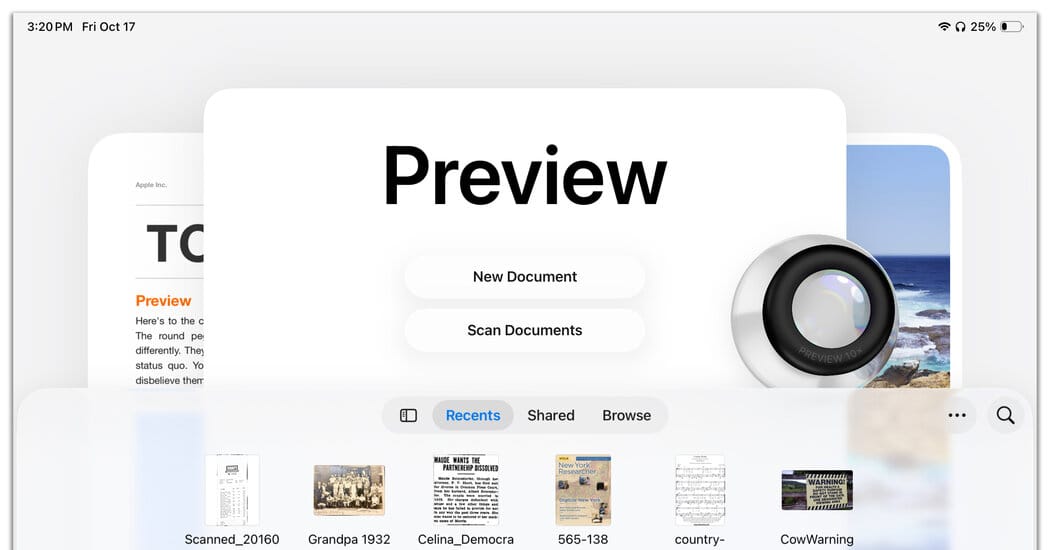
Free software on phones and tablets lets users scan, create, edit, annotate and sign PDF files without a printer or scanner, J.D. Biersdorfer wrote in a Tech Tip column on Oct. 22, 2025.
On iPhone and iPad, Apple added new PDF-handling options in the iOS 26 update with an app called Preview. Preview offers New Document and Scan Documents buttons; tapping Scan Documents opens the camera to capture, crop and rotate pages and save them as PDFs to the Files app or iCloud. The app can store a personal signature for applying to forms, includes Markup tools for handwritten notes and highlights, and provides a Fill and Sign icon for typing into form fields. The iOS Notes app can also scan and save files.
Android users have PDF tools as well. The Google Files app can scan documents and store them locally, and Google Drive lets you open a PDF, tap the pencil icon and choose Form Filling to type into editable text fields, then Save or Save As and attach the completed form to an email. Google’s annotation and markup tools let you add highlights, notes or signatures; the column also notes that Samsung provides its own tools for Galaxy users.
The column presents a quick overview of these built-in options and notes that working with documents is easier on larger screens, but that phones and tablets provide practical ways to handle PDFs when you need to take care of something right away.
Key Topics
Tech, Preview App, Iphone, Ipad, Google Drive, Google Files