
How to unlock Roku's hidden settings and secret menu screens
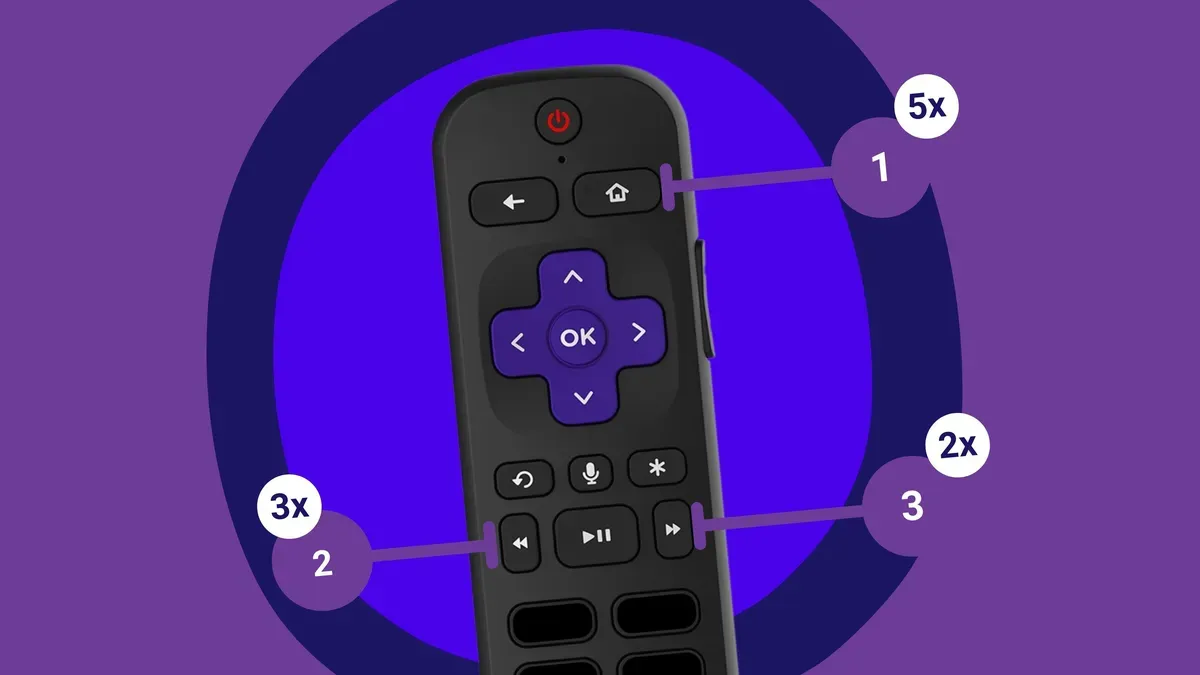
Roku devices hide a number of secret menus that you can reach with a few remote presses. These screens reveal diagnostic information, advanced toggles and developer tools. You can do a soft reset, view a log of every remote button press since your last power cycle, see the exact build of Netflix, Disney+ or Peacock, check CPU temperature, or run a TV input test or AP speed test.
You'll need a Roku device and a Roku remote (or the remote in the Roku app). Developer settings: Home × 3, Up × 2, Right, Left, Right, Left, Right. Network menu: Home × 5, Right, Left, Right, Left, Right — shows IP and MAC addresses, lets you view or join networks and toggle a bandwidth-saver mode.
Wireless secret screen: Home × 5, Up, Down, Up, Down, Up — shows signal-strength bars, antenna info, glitch rates and on-device logs, and can run an AP speed test or purge Wi-Fi settings. Reset and update (Secret screen): Home × 5, Fast Forward × 3, Rewind × 2 — offers factory and soft resets, firmware searches and USB port tests.
roku, roku remote, hidden settings, secret menu, developer settings, network menu, wi-fi, speed test, factory reset, cpu temperature