
Chrome adds 'auto browse' to handle multi-step chores, Google says
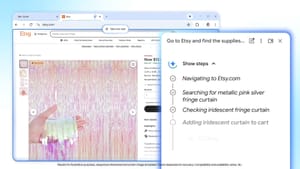
Google has begun rolling out new AI features to its Chrome browser, including a new "auto browse" feature that Google calls "a powerful agentic experience that handles multi-step chores on your behalf."
Google positions auto browse as an extension of its autofill tools but says it can go further. The company says auto browse can identify items in images, search for similar products, add them to your cart, stay within a set budget, and apply discount codes.
Google gave a hypothetical example: "Let’s say you’re planning a Y2K theme party and find inspiration in a photo that perfectly captures that era." According to Google, auto browse — with the multimodal capabilities of Gemini 3 — can identify what’s in a picture and act on that information, and, with permission, use Google Password Manager to handle tasks that require signing in.
The PC Gamer author voiced skepticism about how the feature might misinterpret images — for example, assuming a red sweater implies a party dress code — but notes Google says auto browse will pause at specific points to let users carry out critical tasks themselves, like completing a purchase or posting on social media.
The rollout also includes a new side panel interface for Google Gemini and a "Nano Banana" integration for transforming images on the fly. The author says they have not yet received the update and will test the feature when it arrives.
google chrome, auto browse, gemini 3, google password manager, nano banana, google gemini side panel, autofill tools, apply discount codes, multimodal image identification, transforming images, pc gamer skepticism