
How I use Samsung's secret Wi‑Fi menu to improve connectivity
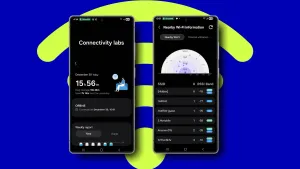
Samsung hides a set of advanced networking tools inside a secret Connectivity labs menu in One UI. It’s available on Galaxy S20 phones and newer running One UI 6 or later. To open it, go to Settings > Connections > Wi‑Fi, tap the three dots for expanded settings, choose Intelligent Wi‑Fi, then scroll to the bottom and tap the software version seven times — on an S25 Plus that item appears as "Intelligent Wi‑Fi 8.0.0." The Connectivity labs item will then appear at the bottom of the page.
The top of the menu displays useful live data: how long your current connection has been active, which access point you’re using, weekly connection time, and which Wi‑Fi bands and standards have been in use. In the author’s setup with a Wi‑Fi 7 Orbi 970, most traffic runs over Wi‑Fi 7 and an Ookla Speedtest recorded about 1,034 Mbps on a 1 Gbps fiber line.
Several tools help tune home or on‑the‑go performance.