
Play Doom on an in-game terminal inside Ultrakill
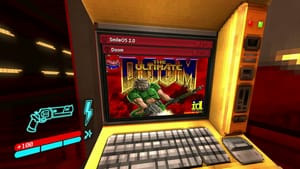
Modder Squaresweets has made The Ultimate Doom playable on the diegetic shop terminals that open every level of the New Blood shooter Ultrakill. The work builds on xabblll’s DoomInUnityInspector and sinshu’s managed-doom port: sinshu’s code brought Doom into a Unity-compatible C# port, xabblll ran it in the Unity editor, and Squaresweets finished the job so it runs inside an actual Unity game.
Installation requires the BepinEx Unity modding utility plus a DOOM.wad file for the game assets; ultradoom.wad from the mod itself is also needed and the mod doesn’t currently support custom projects like MyHouse.wad. The quick steps are: install Ultrakill, add the appropriate BepinEx files to the Ultrakill folder (win_64 for Windows 11), run Ultrakill once, put ultradoom.dll into Ultrakill/BepinEx/plugins, create a doom folder and drop in ultradoom.wad and your DOOM.wad, then start the terminal and click the smiley face in the upper-left to play.
ultrakill, ultimate doom, doom.wad, ultradoom.wad, bepinex, unity, squaresweets, xabblll, sinshu, shop terminals